 Omerta
For your server and friends
Games for your Discord server
Everyone is already in the voice channel, but you want something lively to play. On Omerta there is no bot to set up and no permissions to hand out: voice and camera are built into the game table, and you can call everyone with one link.
- Free
- No bot
- One link
- Camera and voice
Updated
No separate bot needed
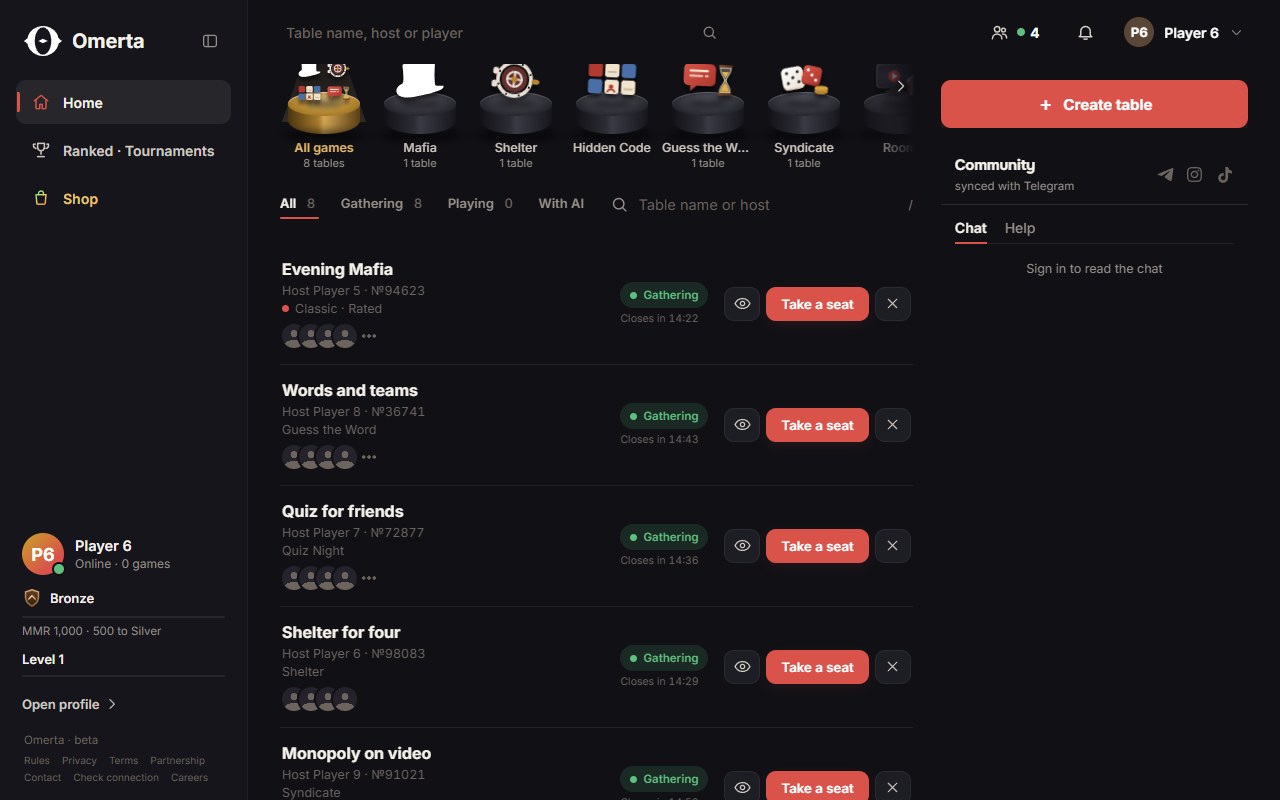
A game for a server is usually a bot: you add it, give it permissions, teach everyone the commands and hope it does not crash in the middle of the evening. On Omerta there is no such step. Omerta is a website: the table creator posts a link in the channel, the others open it in a browser and take a seat. Roles, cards, timers and vote counting are handled by the game server, not by a bot in the chat.
Every table has its own video and voice. You can stay in the Discord voice channel and mute the table, or talk right at the table — then the game itself mutes the players who must stay silent by the rules, for example at night in Mafia.
What to play with a big group
Mafia is the main game on Omerta: Classic for 10 players with a rating, and City Mafia for 5–12 with a Doctor, a Commissioner and a Maniac. No game master is needed, and everyone sees each other on video.
Shelter is a bunker game for 4–12 players: there are half as many places as people, and everyone argues that the colony cannot survive without them. An AI host announces the disaster and the rounds.
Spy is for 3–12 players: everyone knows the location except one person, and you find the stranger by asking questions.
- Mafia online — Classic and City Mafia
- Shelter — the bunker game — who gets into the bunker
- Spy online — find the stranger with questions
Team and word games
Hidden Code is a Codenames-style game for 4–10 players, Guess the Word is a timed Alias-style game for up to 10, and Hint Taken is a one-word clue game for 3–10. Quiz Night with a host and a scoreboard takes up to eight players, and Battleship takes up to ten — in teams if you like.
- Codenames-style game online — Hidden Code
- Alias-style game online — Guess the Word
- Quiz Night with a host — a scoreboard and an answer button
- Battleship online — one on one or in teams
Cards and board games for the evening
Durak is throw-in or passing for 2–6 players. Poker is Texas hold’em for 2–10 players, for chips and with no real money. For two there are long and short backgammon and carrom, and for 2–4 there is Syndicate, in the spirit of Monopoly.
And if the evening is not about games, open the Room: watch a movie together by sharing a screen, sit on camera or hold a meeting — up to twelve people.
- Durak online — throw-in and passing
- Poker with friends — Texas hold’em for chips
- Backgammon online — a game for two
- Watch movies together — movies, hangouts and meetings
How to bring your server to the table
There is nothing to install. If someone drops out, they open the same link and return to the table.
- Sign in to Omerta with email or Telegram and press Create.
- Choose a game and make the table private with a password so that only your people sit down.
- Copy the table link from the menu and post it in a text channel together with the password.
- Everyone opens the link in a browser — on a computer or a phone — and allows access to the microphone and camera.
If you run a community
For servers and communities that want regular game nights or tournaments, Omerta has a separate offer: tables for your members, announcements and joint events.
- Partner with Omerta — for clubs, streamers and communities
FAQ
Frequently asked questions
Do I need to add a bot to my server?
No. Omerta is a website: its server runs the game, and the players join by the link to the table. No separate bot is needed.
Can we play without leaving the voice channel?
Yes. You can leave the table voice off and talk in the channel, but in Mafia it is more convenient to talk at the table — the game mutes microphones by the rules.
Is it free?
Yes, you can play for free. A subscription adds extra features but is not needed to play.
How many people fit at a table?
Up to 12 in City Mafia, Shelter, Spy and the Room, and up to 10 in the word games, poker and Battleship.
Do we need to download anything?
No. Every game opens in a browser on a computer or a phone.
Read next
Related pages
Video chat games
Games with video chat built in: Mafia, Codenames- and Alias-style word games, backgammon and carrom. No Zoom or Discord needed. Free, in your browser.
Open → For your groupOnline party games
Online party games with webcam: Mafia (Werewolf), Codenames- and Alias-style word games, backgammon and carrom for two, movie nights. Free, no download.
Open → For partnersPartnership with Omerta
Partner with Omerta: a bot for Discord, Lolka and Telegram, joint tournaments and evenings, studio games on the platform. Mutual and free — live video games.
Open →